To remember groceries before shopping, keep one running list and check a small set of regular products before you leave or order online. Look at what is already in the kitchen, then decide what needs replacing. OurPantry helps with the recurring part: tracked products come up for review around their usual buying rhythm, with a reason you can check.
Move the thought out of your head when it happens
The moment you notice the last tea bag is often far from the moment you open a shopping list. Add the item when the thought occurs if you can. A running list is useful because it holds small observations between shops. It also means your partner does not have to remember a request from a passing conversation hours earlier.
Give the list a clear purpose: groceries for the next shop. Put other household tasks somewhere else, so a supermarket trip does not require reading through an unrelated list of jobs. Use product names that the person doing the shopping will understand. A specific type or quantity can be helpful when several similar products would otherwise fit the request.
OurPantry gives both household members access to the same next shop. Either person can add the things they notice. That makes the list a place for the household’s observations, rather than a record that only one person is expected to keep up to date.
Review the regulars before the next trip
A running list catches the items someone notices. A short review catches the ones nobody thought to mention. Before shopping, check the products your household uses repeatedly. Look at the actual fridge or cupboard where necessary, and think about how long the remaining amount needs to last. You do not need to count every item to decide whether to add milk.
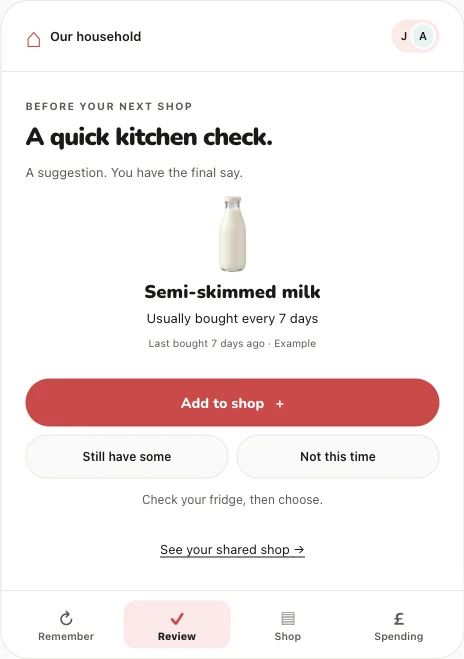
OurPantry asks about tracked products based on their buying rhythms. “Usually bought every 7 days” gives you a starting point for a decision. It is not a claim that the product has run out. Add it to the next shop if it is needed, choose “Still have some” if there is enough, or choose “Not this time” when you want to skip it.
If a suggestion keeps arriving too early or too late, revisit the product’s tracking settings. Buying a larger pack or changing a breakfast habit can change the useful interval. The best rhythm is one that reminds you at a useful time while leaving the final check with you.
Put it into practice
Let OurPantry help with your next grocery shop.
See the app in action →For UK households of two. Email us to register your interest in testing.
Make reminders fit your shopping routine
A reminder helps when it leads to a check you can actually do. Choose a time when you are likely to have a moment to look at the kitchen or talk to the person at home. A notification while you are rushing through a different task may simply become another thing to remember later.
OurPantry’s reminders are optional. When enabled, routine delivery uses your selected local time within the daytime delivery window. Lock-screen copy stays generic, so it can indicate that a few things need checking without displaying individual grocery names or receipt information. You can change your preferences if the timing stops being useful.
Immediately before the shop, open the shared next shop and review the additions from both members. Add ingredients for anything unusual in the coming days, then use the list while shopping. Check off products as you collect them and finish the shop afterwards. Forgetting an occasional item does not mean the routine failed; add what was missed and decide whether it should become a tracked regular. That small correction is more useful than rebuilding the whole system.
Common questions
What should I check when a restock suggestion appears?
Check whether you have enough of that product for the period ahead. The suggestion follows a buying rhythm and cannot measure what is left in your kitchen.
Can I use the restock review without push notifications?
Yes. Notifications are optional. You can open OurPantry and review eligible tracked products as part of preparing your next shop.
Explore how OurPantry works or find more help in our support answers.