
Share a grocery list by giving both people access to the same editable list, then use it for additions and checking off purchases. In OurPantry, create a household and invite your partner with its household code. Both members can work from the same next shop. The useful part is agreeing when each of you checks it, so remembering does not quietly remain one person’s job.
Give groceries a place you both use
A message saying “can you get eggs?” is easy to lose between a photo and a conversation about dinner. A shared list gives that request a place to stay until someone buys it. Agree that groceries go on the list whenever either of you notices something missing. A message can explain an unusual request, but the item should still make its way onto the list.
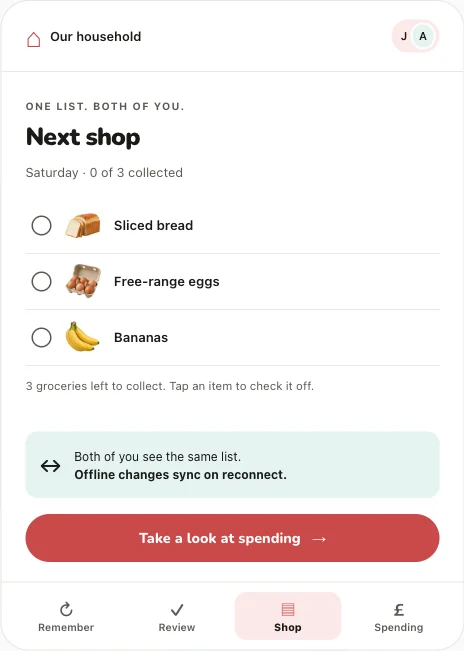
Start small. Add the groceries for your next actual shop before trying to organise everything your household might ever buy. In OurPantry, your household connects two members. Share the household code with the person you want to shop with, and make sure you are both looking at the same household before adding your first few items.
Treat access to the household as access to shared information. The other member can see grocery lists and recorded shopping history, including spending information and receipts you choose to add. Use a personal household with someone you intend to share those details with.
Share the remembering as well as the shopping
Dividing a job into “you make the list, I go to the shop” can still leave one person checking every cupboard. Give each person a concrete part of the preparation. One might look at breakfast staples while the other checks what is needed for lunches. This can be a quick check before the planned shop, rather than an ongoing inventory exercise.
Use regular products to carry some of that memory between shops. OurPantry tracks the groceries you choose and their approximate buying rhythms. When a product may need attention, the restock review explains the suggestion. Either household member can decide whether it belongs on the next shop.
If you still have enough, say so. If plans have changed, skip it for this shop. The point of a shared routine is that both people can answer the small questions. It should be possible for either person to prepare the list without first asking the other to explain the whole kitchen.
Put it into practice
Let OurPantry help with your next grocery shop.
See the app in action →For UK households of two. Email us to register your interest in testing.
Keep one list current during the shop
Check items off when they go into the basket. That makes the remaining list easier to read and gives your partner a useful view of progress once changes sync. If both of you are shopping, agree how you will divide the aisles or products before you start. Shared access helps coordination, but it cannot tell you that someone has picked up an item they have not checked off.
A late addition belongs on the same next shop. If the shopper may have lost signal, use a direct conversation for something urgent: offline changes become visible to the other device only after reconnection. OurPantry supports shopping actions offline, then replays those changes when the connection returns.
After shopping, finish the shop in the app so your completed purchases can contribute to the household’s grocery memory. Recording a total is optional. Before the next trip, review what is due and add anything specific to the coming week. This gives the routine a natural beginning and end without requiring a separate planning meeting.
Common questions
Can both people change the same OurPantry list?
Yes. Both household members can add and edit items and check off groceries on the shared next shop. Changes made offline become shared after reconnection.
Should we keep a second shopping list in messages?
Use one list for the items you intend to buy. Messages can carry context, but copying the same items into several lists makes it harder to know which version is current.
Explore how OurPantry works or find more help in our support answers.